
The moment a customer says yes to a quote, a clock starts ticking. That approval needs to become a booking, a set of documents, and a line in your accounts. The spine connecting all these parts is the job order in freight forwarding. It’s the single source of truth for a shipment, but only if it’s created correctly. Get it wrong, and the error multiplies, costing time and money with every document it touches.
This article is the operator-to-operator guide on what a job order is, what a clean one contains, and how to build it without re-keying data that you already have. For a complete overview of the process, see the complete guide from quote to order.
The short answer
A job order in freight forwarding, also called the job file or simply "the job," is the internal record a forwarder opens for one shipment. It holds the customer, lane, cargo details, buy and sell rates, documents, and key milestones under a single, unique job number. It is the operational and financial backbone of the shipment.
Every cost incurred and every dollar billed must tie back to this job file. It is the single source of truth that allows an operations manager to know where the shipment is and what’s next, while enabling finance to see what it cost, what was billed, and what margin it produced. A clean job file is the foundation of a profitable and compliant shipment.
Job order, transport order, forwarding order, freight order
In the global logistics industry, different terms are often used for the same core concept. The record we call a job order in freight forwarding might be known by other names depending on geography or the software system in use.
Common Synonyms Explained
European forwarders and many ERP transport modules often use terms like transport order, forwarding order, or freight order. While the exact definitions can vary by system, they all refer to the internal instruction to arrange and manage a specific movement of goods.
- A forwarding order often emphasizes the customer's instruction to the forwarder.
- A transport order or freight order may refer more specifically to the operational task of executing the movement, especially in systems that separate customer orders from carrier-facing tasks.
Regardless of the name, the function is the same: to create a single, controlled record that turns a customer’s request into an executable shipment with a clear audit trail.
What goes in a job file
A complete job file freight forwarding record is more than just a booking confirmation. It's a comprehensive dossier containing every critical piece of information for the shipment's lifecycle. A clean file is organized, complete, and auditable, typically broken down into the following sections.
Commercial Data
This section establishes who the job is for and on what terms. It’s the commercial foundation.
- Customer Details: The legal name, billing address, and account code of the party paying for the service.
- The Quote: A direct link to the accepted quotation, including its validity dates, currency, and specific inclusions/exclusions.
- Payment Terms: Agreed credit period, currency, and any special billing instructions.
Routing and Transport Plan
This details the physical journey of the cargo from A to B.

- Routing: Origin and destination addresses, ports/airports (e.g., Nhava Sheva to Felixstowe, Jebel Ali to Los Angeles/Long Beach), and mode of transport (FCL, LCL, Air).
- Carrier & Vessel/Flight: The selected ocean carrier, vessel/voyage, or airline and flight number.
- Schedule: Estimated and actual dates for departure (ETD) and arrival (ETA).
Cargo Specifications
This is the "what" of the shipment. Precision here is non-negotiable.
- Dimensions & Weight: Piece count, package type, dimensions, and both gross and chargeable weight. For ocean containers, this includes the Verified Gross Mass (VGM).
- Commodity: A specific, plain-language description of the goods and the correct HS code.
- Special Handling: Flags for hazardous materials (DG), temperature control, or other requirements, supported by the necessary declarations (e.g., DGD, MSDS).
Money: Buy, Sell, and Margin
The job's profitability lives here. This section tracks every cost and every cent of revenue.
- Buy Rates: The costs owed to carriers, hauliers, customs brokers, and other vendors. Each cost (freight, THC, documentation) should be a separate line item.
- Sell Rates: The charges billed to the customer, as per the accepted quote.
- Margin: The calculated gross profit for the job, showing the difference between total revenue and total costs.
Documents and Milestones
This is the audit trail of the shipment's execution.
- Core Documents: The booking confirmation, shipping instructions, house bill of lading (HBL), master bill of lading (MBL), commercial invoice, packing list, and eventual delivery order.
- Key Dates & Cut-offs: Critical deadlines for documentation and cargo, such as SI, VGM and CY cut-offs, must be tracked.
- Milestones: A log of key events: Cargo Received, Departed, Arrived, Customs Cleared, Delivered.
Why a job order created with errors keeps costing money
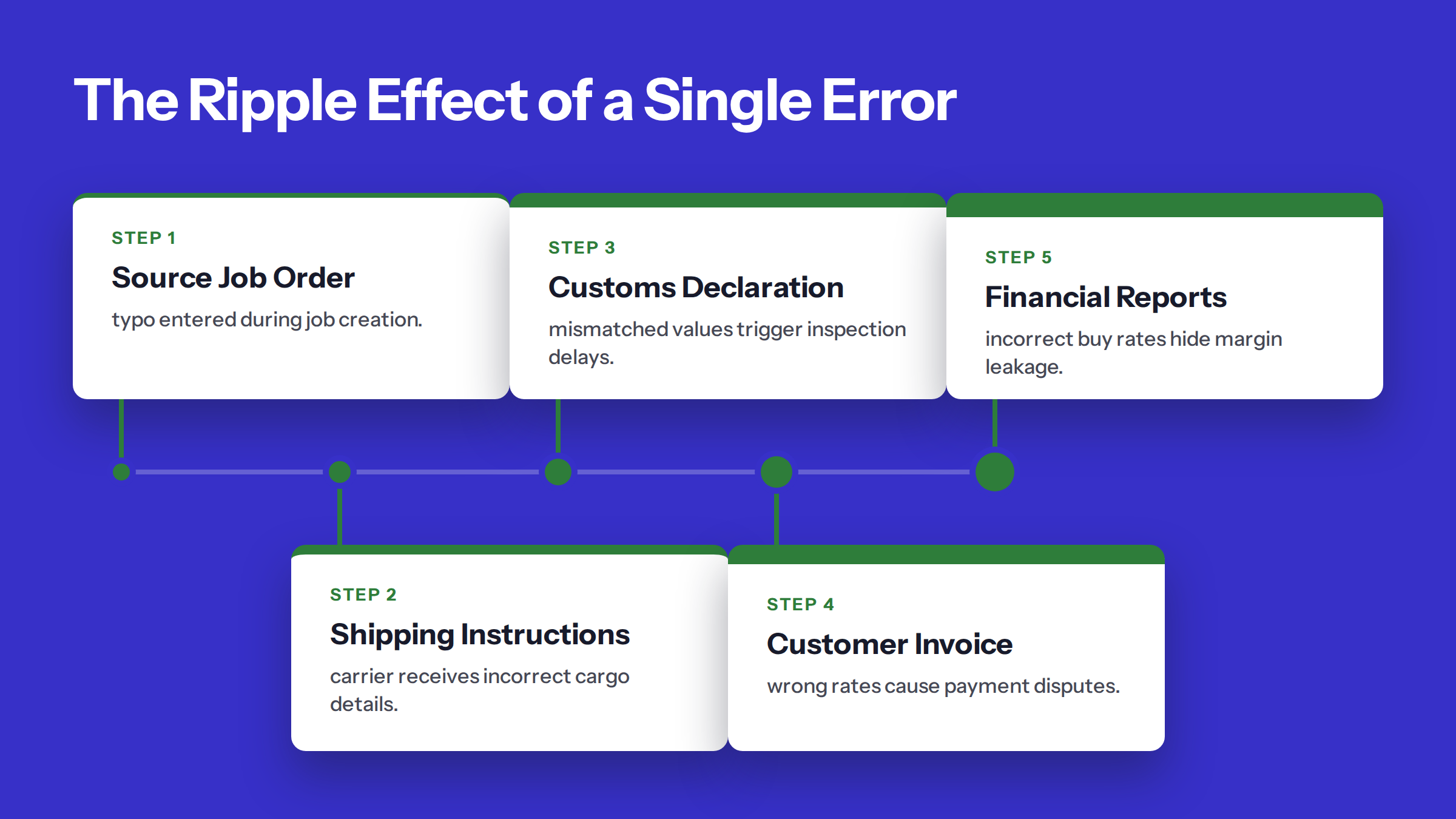
A single mistake in a job order doesn't stay in one place. It travels. Because the job order is the source record, every downstream process copies from it. An error made during job creation is an error that will be duplicated in the shipping instruction, the customs declaration, the invoice, and your financial reports. This is where a simple typo becomes a costly problem.
The Ripple Effect of a Single Error
Think of the workflow. The cargo details from the job are used to draft the shipping instructions sent to the carrier. The values and HS code are used for the customs declaration. The sell rates are pulled directly onto the customer invoice. The buy rates are what your finance team uses to check and approve supplier invoices. A wrong digit in the gross weight, an incorrect consignee, or a misplaced decimal point in a rate will replicate itself across all these critical functions.
The Paper and Email Problem
Much of the industry still relies on manual data exchange. According to the Digital Container Shipping Association (DCSA), ocean carriers issue around 45 million bills of lading a year, but as of 2021, only 1.2% were electronic. This heavy reliance on PDFs and email means data is constantly being re-keyed, creating multiple opportunities for human error.
Where Errors Surface (and Cost You)
Often, the error isn't caught by your team. It’s found late in the process by an external party:
- Customs: A mismatched value or HS code can trigger an inspection, delays, and potential fines.
- The Carrier: An incorrect weight or dimension can lead to a re-weigh, correction fees, and a rolled booking.
- The Customer: An incorrect rate or delivery address on the invoice leads to disputes, payment delays, and damaged trust.
- Your Finance Team: An incorrect buy rate means a job's profitability is misstated until the actual supplier invoice arrives, causing margin leakage.
Each of these scenarios costs real money in the form of administrative time, direct penalties, and strained customer relationships. The key is to prevent the error at the source: the job order.
How to create a clean job order
The cleanest job order in freight forwarding is one that minimizes manual data entry. It’s built directly from the data you already have—the accepted quote—and then methodically completed. This process eliminates re-keying errors and ensures consistency from sale to delivery. See how this compares to other methods in our manual job entry compared guide.
1. Start from the Accepted Quote
Never re-type a won quote. Good practice is to convert the accepted quote directly into the job order. This automatically carries over the core commercial data without error: the customer, lane, cargo description, and agreed rates. The job is born with the correct financial DNA.
2. Check What the Quote Didn't Have
A quote is for pricing, not execution. It rarely contains all the operational details. Run a "missing data" check to identify gaps. This typically includes:
- Final consignee name and full delivery address
- The specific cargo ready date
- Confirmed HS code and cargo value for customs
- Any special handling requirements not mentioned in the quote
3. Ask Once for Everything Missing
Don't bombard your customer with a series of separate emails for each missing detail. Consolidate your needs into a single, clear request. This respects your customer's time and makes your operations more efficient. The goal is to ask once for everything missing, providing a checklist of what you need to proceed with the booking.
4. Confirm Buy and Sell Rates Before Booking
Before the booking request is sent to the carrier, do a final check. Does the sell rate in the job match the accepted quote? Does the buy rate you're about to commit to match the one you used for pricing? If there's a discrepancy, it must be resolved *before* you book, not after you get the invoice.
5. Give Every Document the Job Number
From this point forward, every document, every email, and every cost associated with this shipment must be tagged with the unique job number. This ensures that all information flows back to the central job file, creating a complete and auditable record. This simple discipline is the key to maintaining control. Wondering what this process costs in time? Find out what re-keying costs you.
Where Booking Desk AI fits
The gap between a customer's "yes" and a clean, bookable job order is where most of the manual work and errors happen. This is precisely the gap between the yes and the job order that Booking Desk AI is designed to close.
The customer said yes, and the desk does the rest.
With Booking Desk AI, a won quote becomes a job on its own, fully filled in from the data you already have. There is no re-keying of the lane, cargo, or rates.
The system then automates the next critical steps. It spots what is missing and drafts the email asking for it. Every message a customer sees waits for a person, who can edit, approve, or reject it. An approved message goes out in their own name, maintaining your company's voice and control.
Once the job is complete and your coordinator gives the green light, the carrier booking is pushed. This process runs through connectors FreighAI builds for you, on your company's own carrier accounts. You keep your rates, your relationships, and your control. To learn more, see how the desk works.
With the job built from the quote, your operations team spends its time on exceptions, not data entry. See a yes become a job.
Frequently Asked Questions
What is a job number in freight forwarding?
A job number is a unique reference code assigned to a single shipment by a freight forwarder. It acts as the primary identifier that ties together every document (like the bill of lading and commercial invoice), every communication, every supplier cost, and the final customer invoice for that specific shipment. It ensures all activities and finances for one job are tracked in one place.
Is a job order the same as a booking?
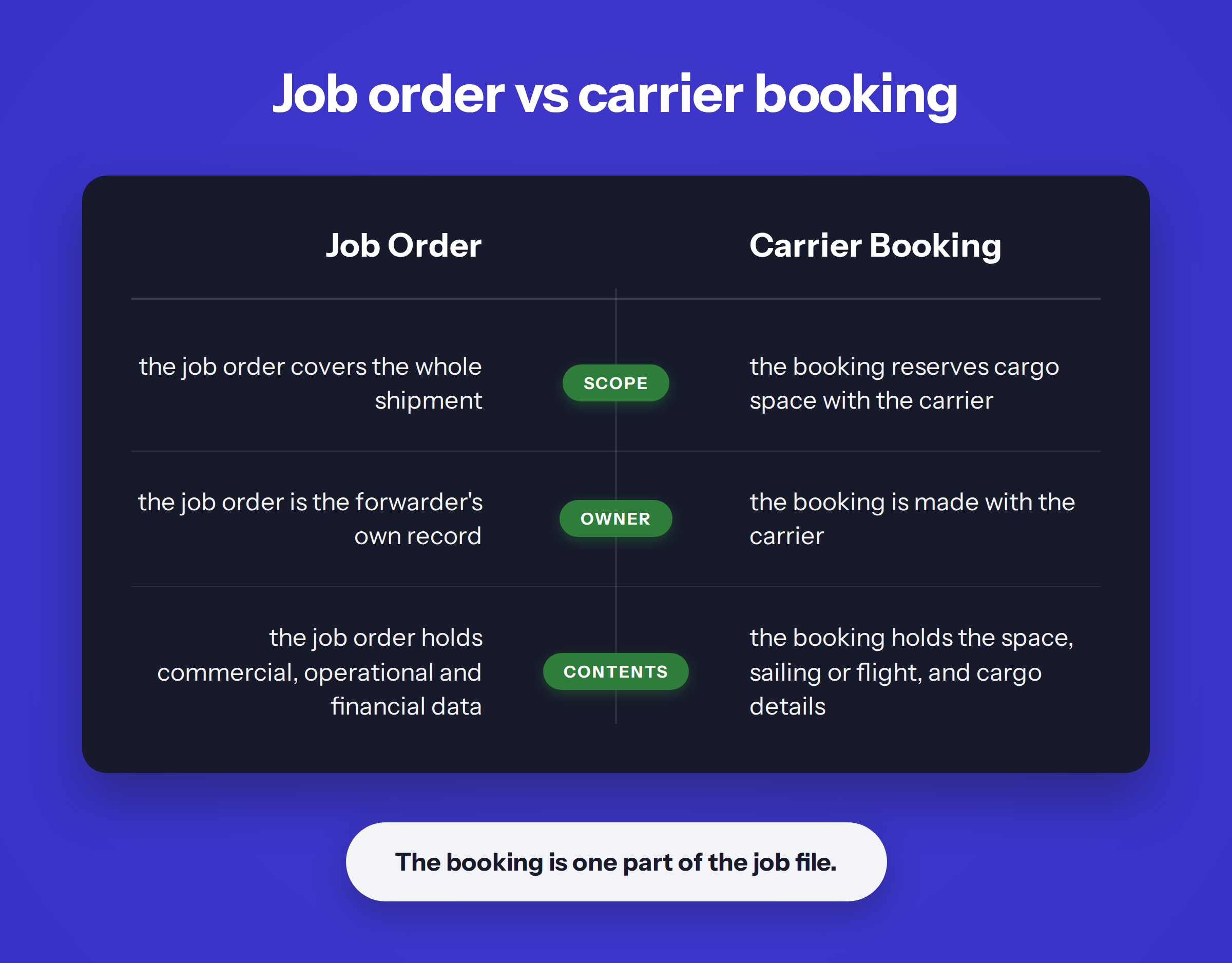
No, they are different. A job order in freight forwarding is the forwarder's internal file for the entire shipment, containing all commercial, operational, and financial data. The booking is just one part of that job file—it is the specific reservation of space made with a carrier (like an airline or shipping line) for the cargo.
Who creates the job order?
The job order is typically created by an operations or booking coordinator at the freight forwarding company. This process usually begins as soon as a customer accepts a quotation and gives the go-ahead to arrange the shipment. In a modern workflow, the job order is created automatically from the accepted quote to avoid manual data entry.
What is the difference between a job file and a house bill of lading?
The job file is the complete internal record of the shipment, containing dozens of data points and documents. The house bill of lading (HBL) is just one of those documents *inside* the job file. The HBL is the transport contract issued by the freight forwarder to the shipper, while the job file is the forwarder's entire administrative and operational container for the shipment.
How can I reduce errors when creating a job order?
The most effective way to reduce errors is to eliminate manual re-keying. Start by creating the job order directly from the accepted customer quote, so that rates, parties, and cargo details are copied automatically. Then, use a systematic checklist to identify any missing operational data (like consignee details or HS codes) and request it from the customer in a single, consolidated message.
Sources & References
This article draws on research and data from the following verified sources:
From reading to watching.
Everything on this page runs live in a working booking desk. Bring one accepted quote and watch it become a booked job order.
Book the working sessionKEEP READING